

.svg)

This is a developing story. PHP released fixes on October 21, and we will keep updating this post as Linux distributions ship packages and attack details emerge. Last updated October 21, 2026, 15:35 UTC.
TL;DR
- PHP has released fixes for two critical vulnerabilities, CVE-2026-109618 and CVE-2026-109619, each CVSS v4.0 9.2. Both allow unauthenticated remote code execution. Update to PHP 8.5.12, 8.4.27, 8.3.36 or 8.2.35, or to your distribution's patched package, and restart every PHP worker.
- Every PHP installation serving web requests is at risk: PHP-FPM, Apache mod_php, php-cgi, FrankenPHP and LiteSpeed. PHP rates the risk highest for mod_php.
- PHP 8.1 and older get no official release. PHP published minimal source backports for 7.4, 8.0 and 8.1; otherwise use an LTS vendor or upgrade.
- Exploit code is public and hosting providers report active attacks. Where you cannot patch today, the layers below reduce exposure, but PHP says no configuration change makes an installation safe.
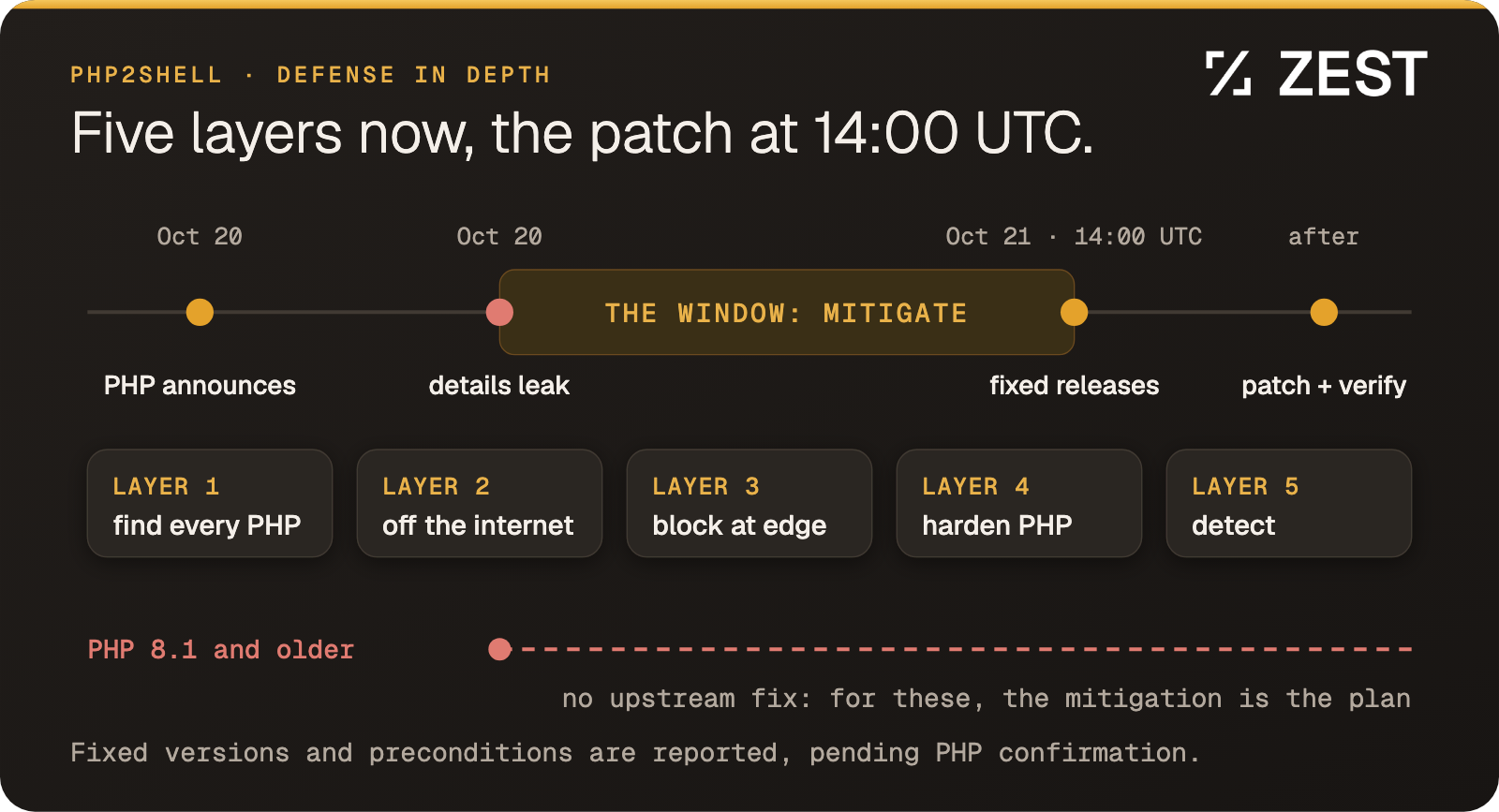
On October 20, PHP's security team pre-announced an emergency release: two critical vulnerabilities, each rated 9.2 under CVSS v4.0, with fixes due Wednesday, October 21 at 14:00 UTC. Affected versions and technical details would ship with the fix.
The embargo did not hold. Within hours, CVE identifiers, a "php2shell" label and claims of unauthenticated remote code execution back to PHP 5 were circulating. By the next morning, defenders were reporting php2shell scanner traffic, exploit code claiming working remote code execution was public, and hosting providers were reporting active attacks.
PHP shipped the fixes on October 21, ahead of its 14:00 UTC schedule. This post covers how to patch, and what to do, layer by layer, for every server you cannot patch today.
What PHP confirmed
PHP's security advisory, published with the releases, confirms:
- CVE-2026-109618, remote code execution through out-of-memory corruption, and CVE-2026-109619, remote code execution through stale global state, both CVSS v4.0 9.2
- fixed releases 8.5.12, 8.4.27, 8.3.36 and 8.2.35, with patches shared with Linux distributions and LTS vendors in advance
- every PHP installation serving web requests is at risk: PHP-FPM, Apache with mod_php, php-cgi, FrankenPHP and LiteSpeed
- no release for PHP 8.1 and older, with minimal source backports published for 7.4, 8.0 and 8.1
- a demonstrated exploit against mod_php, where an unauthenticated request triggers the attack before any application code runs
Activity:
- at least one defender reported scanner traffic with
php2shelluser agents in their logs by 04:35 UTC on October 21 - from 07:34 UTC, several hosting providers reported active exploitation to Patchstack
- at 07:43 UTC, Cloudflare's CTO said the company is seeing early attacks and has deployed WAF rules for the known exploit vectors to all plans, including Free
- at 08:31 UTC, a proof of concept was published on GitHub that claims working code execution against PHP 8.4.4 and 8.2.34, adapting to each build's memory layout
- Aikido reports exploitation in the wild and says configuration changes alone do not protect
Exploit code is circulating publicly, and attacks are under way. Our researchers confirmed the vulnerability in our lab, and watchTowr reports reproducing one of the two bugs. PHP rates both bugs 9.2, while the leaked post and watchTowr say 10.0. Either number means remote and critical.
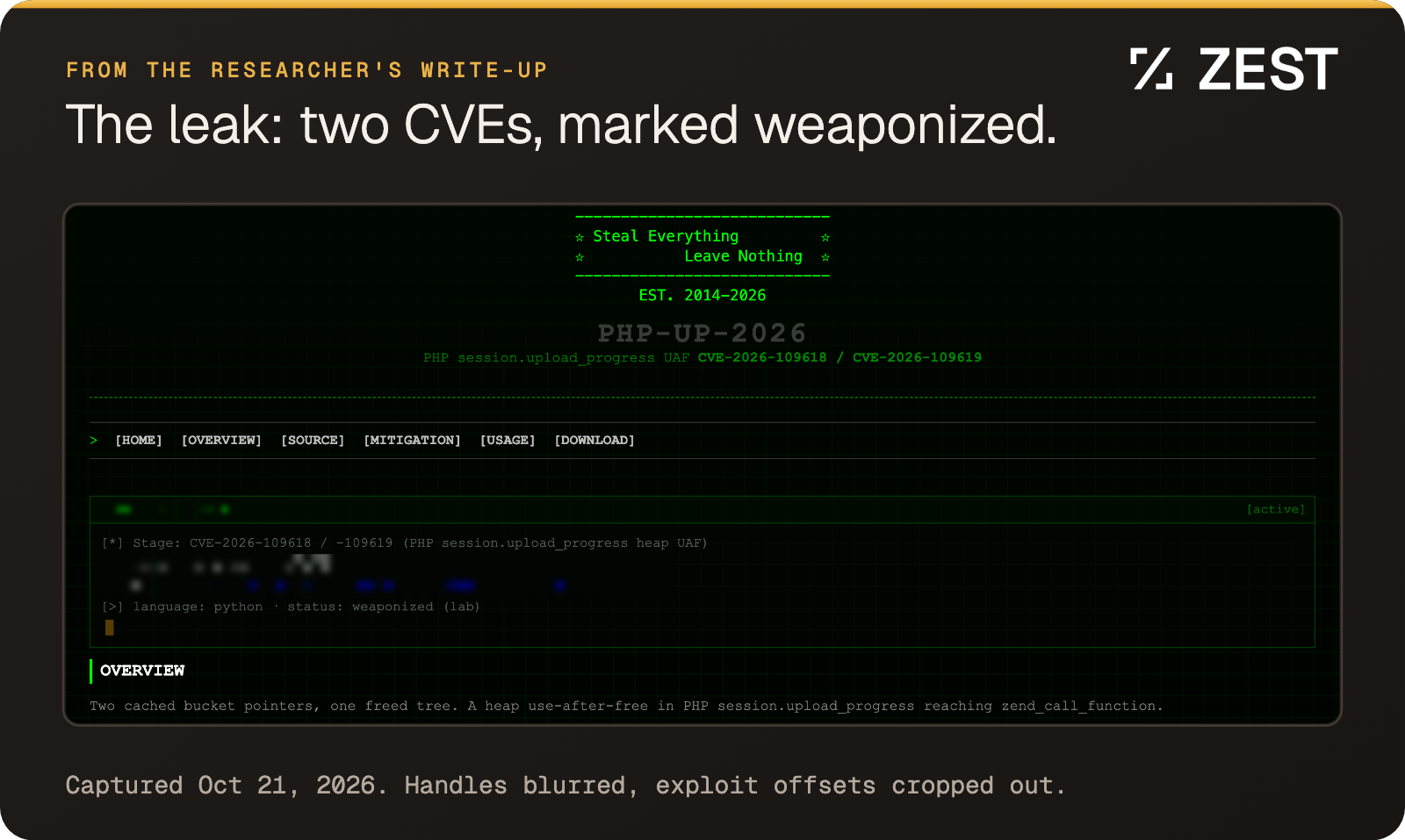
The researcher who claims the find has published a write-up naming both CVEs.
The vulnerability
PHP's advisory describes two separate bugs, both in how PHP sets up and cleans up a request, before your application code runs.
CVE-2026-109618 (GHSA-w8hw-w9fx-j79w): if PHP runs out of memory while it is still filling in internal request data, the failure interrupts it halfway. Request cleanup then treats the partly initialized data as valid. The advisory's mitigations point at request size and structure as the way to drive PHP into that failure.
CVE-2026-109619 (GHSA-6wmf-4rv5-p3rp): some internal state that belongs to one request survives after the memory behind it has been freed, and the next request handled by the same worker can use it before PHP resets it. Session upload progress, the feature behind file upload progress bars, which is on by default, is one confirmed way in. On PHP 8.5, fatal error backtraces are another. Per-request PHP settings that emit a warning before the request starts are a third: php_value or php_flag in .htaccess or Apache directory configuration on mod_php, and PHP_VALUE or PHP_ADMIN_VALUE passed to FPM by the web server.
Both bugs run before any application logic, so no login, no file write access and no application flaw are needed. PHP rates the risk highest for Apache with mod_php, where it validated unauthenticated remote code execution with default input and memory limits, regardless of the application. PHP-FPM ends a worker when request startup fails, so there the out-of-memory bug depends on the application. PHP considers FrankenPHP likely to behave like mod_php.
The leaked write-up, and early analyses including ours, focused on session upload progress. It turned out to be one path to one of the two bugs. We checked one precondition of that path in our lab on PHP 8.3 with default settings: PHP tracked upload progress only when the request carried a session ID, either in the PHPSESSID cookie or as a field in the multipart body. It ignored a session ID in the query string, and it tracked progress for a script that never starts a session, so an application that does not use PHP sessions is still exposed.
Patch now
Update to PHP 8.5.12, 8.4.27, 8.3.36 or 8.2.35. PHP shared the patches with Linux distributions and LTS vendors in advance, and their packages often keep the old upstream version number, so check your vendor's advisory for the package release, not the version string. PHP also warns that the volunteer-run rpms.remirepo.net repository will not have updates on October 21, so switch to distribution packages or build from source.
Then:
- restart every PHP worker: a php-fpm master or Apache process started before the update still runs the old code
- rebuild container images on the fixed base and redeploy, because production runs the old image until you do
- verify through the web server, with check 1 from the curl section below or the check page from layer 4
Patch internet-facing servers first, then internal web servers, then images, then hosts that only have the PHP command line.
Distribution status as of 15:30 UTC on October 21: NVD has published both records, but most scanners have not yet added checks. Amazon Linux lists its PHP packages as Pending Fix, and Amazon Linux 2023's php8.1 as No Fix Planned. Gentoo has released GLSA 202610-02. Check your distribution's tracker before you assume a package is fixed.
Five layers for what you cannot patch yet
No single control covers this. Gina Peter Banyard, a PHP core developer, put it plainly: "the only mitigation is patching / upgrading PHP." The layers below cut the odds and the damage until you can.
Each layer covers a gap in the one before it. A WAF can miss a request that it and PHP parse differently. A configuration switch closes one confirmed path at most. And for PHP 8.1 and older, and for appliances and images you do not control, a patch may be days away or may never come.
Every snippet marked tested below was run in containers against nginx 1.27, Apache 2.4, ModSecurity with the OWASP Core Rule Set, and PHP 8.3 under both Apache and php-fpm.
Layer 1: find every PHP that answers HTTP
Start with PHP that serves web traffic: php-fpm, Apache's mod_php, php-cgi and LiteSpeed's lsphp. A host that only has the PHP command line, used for Composer or cron jobs, is outside the web request path and can wait.
# PHP processes serving web traffic
ps -eo user,args | grep -E "[p]hp-fpm|[h]ttpd|[a]pache2|[l]sphp"

# installed PHP packages
dpkg -l | grep -E "php|libapache2-mod-php"   # Debian, Ubuntu
rpm -qa | grep -i php                        # RHEL, Amazon Linux
apk info -v | grep -i php                    # Alpine

# PHP container images on a host
docker images --format '{{.Repository}}:{{.Tag}}' | grep -i php
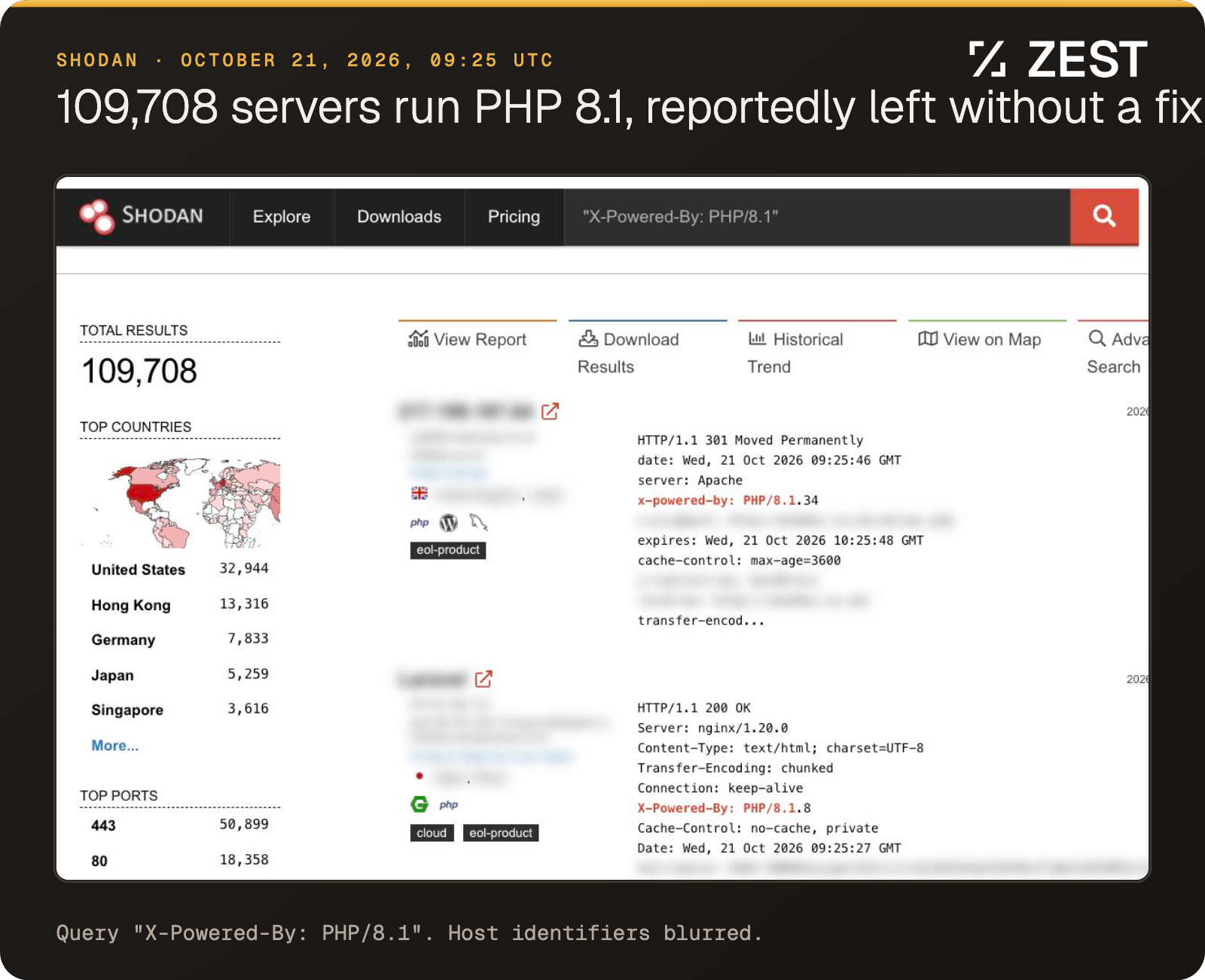
Then check the places PHP hides: images built on php:*-fpm or php:*-apache, appliances and hosting panels that bundle their own PHP, and Windows servers with a PHP binary in a tools folder. Version banners show how much of this is exposed. On October 21, a Shodan search on the X-Powered-By header found:
- about 349,000 servers on PHP 5 and 329,000 on PHP 7
- 78,000 on PHP 8.0 and 110,000 on PHP 8.1
- 23,000 to 50,000 each on the releases that were current until October 21, 8.5.11, 8.4.26, 8.3.35 and 8.2.34, all affected
That is about 866,000 servers on branches that get no official release, and the counts include only servers that advertise their version. To see your own footprint, search for "X-Powered-By: PHP/" scoped to your networks with net: or org: (search filters need a Shodan account).
Layer 2: take PHP off the open internet
The strongest control you have today is making sure an anonymous request never reaches PHP. The same core developer suggested that turning a server off for a day may be the most sensible move, for anyone who can afford it.
For the rest, put authentication or an allowlist in front of PHP: a VPN, an IP allowlist, an identity-aware proxy, or HTTP basic auth at the reverse proxy for admin panels and internal tools. In our test, an unauthenticated multipart POST got a 401 from nginx and php-fpm never saw the request.
# server {} block: nothing reaches PHP without credentials
auth_basic           "Restricted";
auth_basic_user_file /etc/nginx/.htpasswd;   # create with: htpasswd -c /etc/nginx/.htpasswd ops
This does not work for public sites. Those need layers 3 to 5 and the patch.
Layer 3: block the trigger at the edge
For the session path of CVE-2026-109619, the trigger is a multipart POST carrying the upload progress field, PHP_SESSION_UPLOAD_PROGRESS by default. Only applications that show upload progress bars send it. The field has to arrive before the file parts, but an attacker can still push it deep into the body by padding it with large ordinary fields first. Cloud WAFs inspect only the first few kilobytes of a body, so treat these rules as a filter for unmodified tooling and rely on the web server fence below for the rest.
ModSecurity or Coraza (tested). ModSecurity reads the whole body up to its configured limit, so in our test it still blocked the field behind a 20 KB padding field. The second rule targets one public proof of concept, which sends twenty file parts with filenames around 256 KB long. Real filenames stay far below 1 KB, even in non-Latin scripts:
SecRule ARGS_NAMES "@streq PHP_SESSION_UPLOAD_PROGRESS" \
    "id:1096180,phase:2,deny,status:403,log,msg:'php2shell: PHP_SESSION_UPLOAD_PROGRESS field'"
SecRule FILES "@rx ^.{1024}" \
    "id:1096181,phase:2,deny,status:403,log,msg:'php2shell: upload filename over 1023 bytes'"
Both rules need request body inspection on (SecRequestBodyAccess On). Keep strict multipart validation on as well. ModSecurity's recommended configuration ships it as rule 200003, which rejected our malformed test bodies with a 400. Attackers bypass WAFs by sending bodies the WAF and PHP read differently, and strict validation narrows that gap.
AWS WAF, as a rule in the web ACL's JSON editor. We validated it against the AWS WAF API model, not against live traffic. AWS WAF inspects the first 8 KB of the body on Application Load Balancers and the first 16 KB on CloudFront by default:
{
  "Name": "php2shell-upload-progress",
  "Priority": 0,
  "Action": { "Block": {} },
  "VisibilityConfig": {
    "SampledRequestsEnabled": true,
    "CloudWatchMetricsEnabled": true,
    "MetricName": "php2shell-upload-progress"
  },
  "Statement": {
    "ByteMatchStatement": {
      "FieldToMatch": { "Body": { "OversizeHandling": "CONTINUE" } },
      "PositionalConstraint": "CONTAINS",
      "SearchString": "PHP_SESSION_UPLOAD_PROGRESS",
      "TextTransformations": [ { "Priority": 0, "Type": "NONE" } ]
    }
  }
}
Azure Application Gateway WAF, as a custom rule. Use PostArgs, which covers multipart bodies. RequestBody only applies to URL-encoded forms on Application Gateway:
{
  "name": "php2shellUploadProgress",
  "priority": 5,
  "ruleType": "MatchRule",
  "action": "Block",
  "state": "Enabled",
  "matchConditions": [
    {
      "matchVariables": [ { "variableName": "PostArgs", "selector": "PHP_SESSION_UPLOAD_PROGRESS" } ],
      "operator": "Any",
      "negationCondition": false,
      "matchValues": []
    }
  ]
}
Google Cloud Armor, as a custom rule on your security policy:
gcloud compute security-policies rules create 1000 \
    --security-policy=YOUR_POLICY \
    --expression="request.body.contains('PHP_SESSION_UPLOAD_PROGRESS')" \
    --action=deny-403
Cloudflare, as a custom rule expression. The multipart and raw body fields require an Enterprise plan:
any(http.request.body.multipart.names[*][0] == "PHP_SESSION_UPLOAD_PROGRESS")On every Cloudflare plan, keep the managed ruleset on. Cloudflare shipped four new "Generic Rules - Anomalous Execution" rules in an emergency release on October 21, and its CTO says rules for the known exploit vectors are live for all customers, including Free, with more coming as new vectors appear. He also calls them a stopgap. Someone has claimed a WAF bypass for this exploit, and nobody has shown it publicly yet. Do not rely on any WAF alone.
The Azure, Cloud Armor and Cloudflare rules follow each vendor's documented syntax. We did not test them against live traffic. Deploy in log or count mode first, confirm nothing legitimate matches, then switch to block.
No WAF in front of an AWS Application Load Balancer? A listener rule can refuse multipart requests on its own, as Azara shared on X. Give it a number lower than your forwarding rules, and add a rule with an even lower number that forwards your real upload paths first. We checked it against AWS documentation, not live traffic:
Type: AWS::ElasticLoadBalancingV2::ListenerRule
Properties:
  ListenerArn: <listener-arn>
  Priority: 10
  Conditions:
    - Field: http-header
      HttpHeaderConfig:
        HttpHeaderName: Content-Type
        Values:
          - "*multipart/form-data*"
  Actions:
    - Type: fixed-response
      FixedResponseConfig:
        StatusCode: "403"
        ContentType: "text/plain"
        MessageBody: "Temporarily unavailable"
Some widely shared mitigation lists, including one labeled as generated by an LLM, go further and block every request that carries the PHPSESSID cookie. That logs out every user of a session-based application. On its own it also misses the attack: in our lab, PHP accepted the session ID as a multipart form field too. Those lists only hold because they also block all multipart traffic.
Then fence multipart at the web server (tested). Most routes never take uploads. Replace /upload/ with your real upload paths.
nginx, in the http block and the server block:
# http {} block
map $http_content_type $php2shell_multipart {
    default                  0;
    "~*multipart/form-data"  1;
}
map "$php2shell_multipart:$uri" $php2shell_block {
    default                  0;
    "~^1:/(?!upload/)"       1;   # multipart allowed only under /upload/
}

# server {} block
if ($php2shell_block) { return 403; }
Apache 2.4, in the virtual host:
<If "%{HTTP:Content-Type} =~ m#multipart/form-data#i && %{REQUEST_URI} !~ m#^/upload/#">
    Require all denied
</If>
In an Apache expression, %{CONTENT_TYPE} is the response content type, not the request's. Our first version used it, never matched, and kept passing the traffic it was meant to block. Use %{HTTP:Content-Type}.
Syhunt published a small Apache kit built on the same idea, a .htaccess rule that refuses multipart POSTs, with test pages that confirm the block is working. Delete the test pages afterward, as its README says.
The fence does not cover CVE-2026-109618, which is driven by memory exhaustion. For that bug, PHP recommends limits at the web server or proxy on decoded request size, input field count, multipart part count, header count and nesting depth, and the limits must also cover requests without a usable Content-Length.
Layer 4: harden PHP
PHP's advisory lists configuration changes that reduce exposure to specific attack paths. None of them makes an installation safe.
For CVE-2026-109619, switch off session upload progress and restart every worker. PHP says this blocks the confirmed session paths but not other variants. It costs nothing unless your application shows upload progress bars.
The setting is INI_PERDIR, so ini_set() cannot change it. Set it where your web SAPI reads configuration, then restart every php-fpm pool or the web server (tested for php.ini and the php-fpm pool):
; php.ini, or a file in conf.d/
session.upload_progress.enabled = Off; php-fpm pool, for example /etc/php/8.3/fpm/pool.d/www.conf
php_admin_flag[session.upload_progress.enabled] = off# Apache virtual host with mod_php
php_admin_flag session.upload_progress.enabled off# Dockerfile based on the official php image
RUN echo "session.upload_progress.enabled=0" \
> "$PHP_INI_DIR/conf.d/zz-php2shell.ini"Do not use a .user.ini file or ini_set() for this setting. PHP's advisory says it must be set where it applies before request parsing.
Then verify through the web server, because the PHP command line usually reads a different php.ini. In our php-fpm test container, the pool reported "0" while php -r in the same container still reported "1". Drop this file in the web root, request it, then delete it:
<?php
header('Content-Type: text/plain');
var_dump(ini_get('session.upload_progress.enabled'));   // want string(1) "0" or string(0) ""
Then apply the advisory's other measures where they fit. We have not tested these; set them in the php-fpm pool or server configuration so applications cannot override them:
; php-fpm pool, for example /etc/php/8.4/fpm/pool.d/www.conf
php_admin_value[memory_limit] = -1             ; CVE-2026-109618, read the caveat below
php_admin_value[post_max_size] = 8M            ; 32M if the application takes uploads
php_admin_flag[fatal_error_backtraces] = off   ; PHP 8.5 only, CVE-2026-109619
An unlimited memory_limit removes the PHP memory limit an attacker can trip, but PHP notes that a real allocation failure can still reach the bug, and an unlimited worker can exhaust the host. PHP recommends a container or cgroup memory limit as the availability boundary, ideally one that kills only the affected worker, and warns against RLIMIT_AS and RLIMIT_DATA, which can cause the vulnerable failure. Keep upload_max_filesize below post_max_size.
The advisory adds three more measures:
- lower
max_input_nesting_level(64 by default), and cap input variables, multipart parts and uploads withmax_input_vars,max_multipart_body_partsandmax_file_uploads - remove per-request PHP settings that emit a warning before the request starts, such as obsolete
php_valueorphp_flaglines in.htaccesson mod_php, orPHP_VALUEandPHP_ADMIN_VALUEpassed from nginx or Apache to FPM, and prefer php.ini or the FPM pool - if performance allows, set
pm.max_requests = 1so each FPM worker handles a single request and no state carries over to the next
Also fix fatal errors and timeouts an attacker can trigger. Hiding diagnostics with error_reporting, display_errors or @ does not help.
Then limit what a successful request can do next:
; php.ini: stop advertising the version to mass scanners
expose_php = Off

; php.ini: remove the usual command-execution functions
disable_functions = exec,passthru,shell_exec,system,proc_open,popen,pcntl_exec
expose_php = Off removes the X-Powered-By: PHP/x.y.z header that internet-wide scanners read to pick targets. A determined attacker can still fingerprint the version, but you drop off the easiest target lists.
disable_functions breaks applications that shell out, so test it on staging first. Researchers have bypassed it before, and nobody has confirmed whether it blocks code execution through this bug. Treat it as a speed bump for the webshell that usually follows.
Outside PHP:
- run each php-fpm pool as its own unprivileged user that cannot write to the web root
- block outbound connections from the web tier, except the destinations the application needs
- trim the IAM role or service account attached to PHP hosts to what the application needs, because a shell inherits it
- keep secrets and data off PHP hosts where you can, and ship logs off the host so an attacker cannot erase them
Layer 5: detect attempts
These indicators come from public posts and one public proof of concept. They are trivial to change, so a clean result means only that nobody used the defaults:
- user agents
php2shell-109618andphp2shell-109619, reported in one defender's logs - multipart boundaries
B7kQpoc618,B7kQpoc619andBGCTXBOUNDARY, and the session cookiePHPSESSID=bgctxpoc - two POSTs in quick succession that both carry
PHP_SESSION_UPLOAD_PROGRESS, the first with very long filenames - a
pwned.txtfile underwp-content/uploads/, written by the demonstrated chain on WordPress
None of these sources include attacker IP addresses yet.
# scanner user agents in access logs (paths vary by distribution)
grep -hE "php2shell-10961[89]" /var/log/nginx/access.log* /var/log/apache2/access.log* /var/log/httpd/access_log* 2>/dev/null

# php-fpm workers that crashed (SIGSEGV, SIGABRT, SIGBUS)
grep -hE "exited on signal (6|7|11)" /var/log/php*fpm*.log

# PHP files created or changed in web roots since the leak, and the demo marker
find /var/www -type f \( -name "*.php" -o -name "pwned.txt" \) -newermt "2026-10-20"
Standard access logs do not record the multipart boundary or the form field names. To see those, log at the WAF or the reverse proxy.
Failed exploit attempts often crash the worker, so a burst of SIGSEGV lines on an internet-facing pool deserves a look. In your EDR, alert on php-fpm, httpd or apache2 spawning a shell, an interpreter, curl or wget. On Windows hosts, the Sigma rule for php.exe run with -r catches inline PHP execution, which is generic but cheap to enable.
Our researchers confirmed the vulnerability in our lab, and exploit code is now circulating publicly. Treat every exposed PHP server as reachable. A worker that does not crash is no proof you are safe: a successful exploit leaves the worker running. Do not run public exploits against production, and be careful what you download: pastes and repositories titled as "verified" exploits are a familiar lure for malware.
Check a server with curl
No safe request can prove a server is exploitable. These checks show whether the conditions for the attack are present and whether your layers hold, and none of them sends an exploit. Run them only against servers you own or are authorized to test, from outside your network:
H=https://www.example.com   # any URL on the server that PHP answers

# 1. Does the server advertise PHP, and which version?
curl -sI "$H/" | grep -i '^x-powered-by'

# 2. Is session upload progress on? Needs the check page from layer 4.
curl -s "$H/php2shell-check.php"

# 3. Does your edge block the trigger field? Want 403.
curl -s -o /dev/null -w '%{http_code}\n' "$H/" -F 'PHP_SESSION_UPLOAD_PROGRESS=zest-check' -F 'note=harmless'

# 4. Does the multipart fence hold outside your upload paths? Want 403.
curl -s -o /dev/null -w '%{http_code}\n' "$H/" -F 'note=harmless'

# 5. Repeat check 3 against the origin IP, around your CDN. Want 403 or no answer.
curl -s -o /dev/null -w '%{http_code}\n' --resolve www.example.com:443:203.0.113.10 https://www.example.com/ -F 'PHP_SESSION_UPLOAD_PROGRESS=zest-check' -F 'note=harmless'
How to read the results:
- check 1:
X-Powered-By: PHP/8.5.11means the server runs 8.5.11, which is affected: anything below 8.5.12, 8.4.27, 8.3.36 or 8.2.35 is. Distribution builds add a suffix such as-1ubuntuand backport fixes, so check the package version on the host. No header does not mean no PHP:expose_phpmay be off, or a proxy may strip it - check 2:
string(1) "1"means the confirmed session path to CVE-2026-109619 is open;"0"or""means layer 4 is in place - check 3: a 200 means the trigger field reached your application. The request carries no session ID, so PHP does not track it even then. In our lab it created no session, while the same request with a
PHPSESSIDcookie did - check 5: a WAF on the CDN does nothing for a request that reaches the origin directly. Replace the IP with your origin's address, and lock the origin down to the CDN's ranges if it answers
We ran these against PHP 8.5.11 in our lab. Checks 3 and 5 returned 403 behind ModSecurity with the layer 3 rules, and check 4 returned 403 behind the Apache fence and 200 on an upload path.
PHP 8.1 and older: the mitigation is the plan
PHP 8.1 and older get no official release. That leaves:
- PHP's minimal source backports for 7.4, 8.0 and 8.1, if you build PHP yourself
- vendor extended support: if a distribution or LTS vendor shipped your PHP, ask for its backport and a date
- layer 2 permanently, so nothing anonymous reaches it, plus layers 3 to 5
- migration to 8.2 or later; 8.2 itself leaves security support on December 31, 2026, so 8.3 is the better target
Appliances that bundle their own PHP are in scope too. Scanners have started flagging F5 BIG-IP's bundled PHP 5.4.45 for both CVEs. F5 has not published an advisory yet, and you can't patch that PHP yourself; the fix has to come from F5. Until then, keep the BIG-IP management interface off the internet and watch F5's advisories.
A server you cannot patch is acceptable only behind controls you can show are in place.
How ZEST approaches this
ZEST is a Continuous Threat Exposure Management (CTEM) platform. When a vulnerability leaks before its patch, there is nothing to scan for yet, so ZEST starts from inventory.
It finds PHP in what your connected tools already report: package inventories on hosts, container image contents and the external attack surface. It ties each runtime to its asset and owner and validates which ones are reachable from the internet, so you know which hosts need layer 2 first.
During the window, a compensating control ZEST can verify, such as a WAF rule in block mode in front of the asset, is recorded as evidence against the specific vulnerability. The vulnerability stays visible and returns to the queue if the control disappears. After the release, automated remediation tracks each patch through to verification by rescan, including the images that need a rebuild and a redeploy.
To see where PHP runs across your cloud and on-prem estate, which of those hosts still run an affected version and which are reachable from the internet, book a demo with ZEST.
Sources
- PHP security advisory, October 21, 2026
- GHSA-w8hw-w9fx-j79w: CVE-2026-109618
- GHSA-6wmf-4rv5-p3rp: CVE-2026-109619
- PHP manual: Session upload progress
- Gina Peter Banyard, PHP core developer
- watchTowr: PHP CVE-2026-109618 FAQ
- Flatt Security: php2shell
- Cloudflare: emergency WAF release and CTO Dane Knecht
- Shodan: "X-Powered-By: PHP/8.1"
About The Author
.jpg)